When Michaels Stores moved its retirement plan administration from Vanguard to Voya, many employees had questions. Where did my money go. Is my information safe. How do I log in now. The transition caused a brief blackout period, which is normal during plan transfers, but now accounts are live and ready to use on the Voya platform.
If you are a current or former Michaels employee, having access to your 401k plan is essential. Your retirement savings represent years of effort and dedication. A smooth and secure way to check balances, update beneficiaries, and manage future contributions can bring peace of mind. This guide walks you through every step in a simple and clear way, so you can feel confident using your new Voya account.
Understanding the Michaels and Voya 401k Transition
Michaels Stores partnered with Voya to manage their employee retirement plans. During the transfer process:
• All account balances were carried over
• Contribution history was preserved
• Investment selections moved with the account
• Beneficiaries were transferred
The goal of this change was accuracy and improved digital access. Voya provides strong tools, educational support, and easy to use account management through both its website and mobile app. This helps employees stay connected to their retirement goals.
Even though the company handling the plan changed, your savings did not disappear. Everything was transferred into a secure Voya retirement account tied to your personal details.
Official Website to Access Michaels 401k Voya Account Your Account
To get started, go to the official Michaels Voya portal:
michaels401k.voya.com
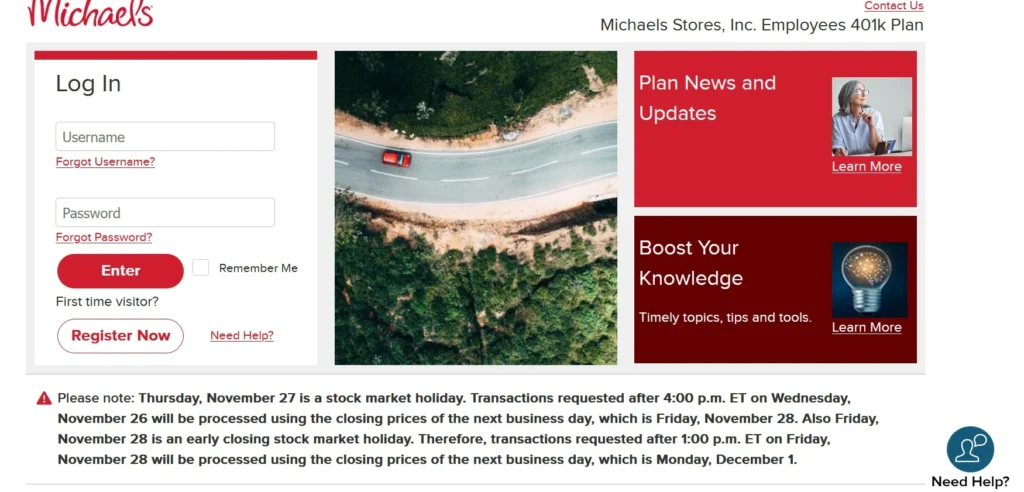
This is the only website you should use for registration and login.
When you arrive on the homepage, you will see an option that says Register Now. This is the first step for new users who have not previously created a Voya account for Michaels 401k.
How to Register Your Voya Account Step by Step?
Follow these steps carefully to access your account without confusion.
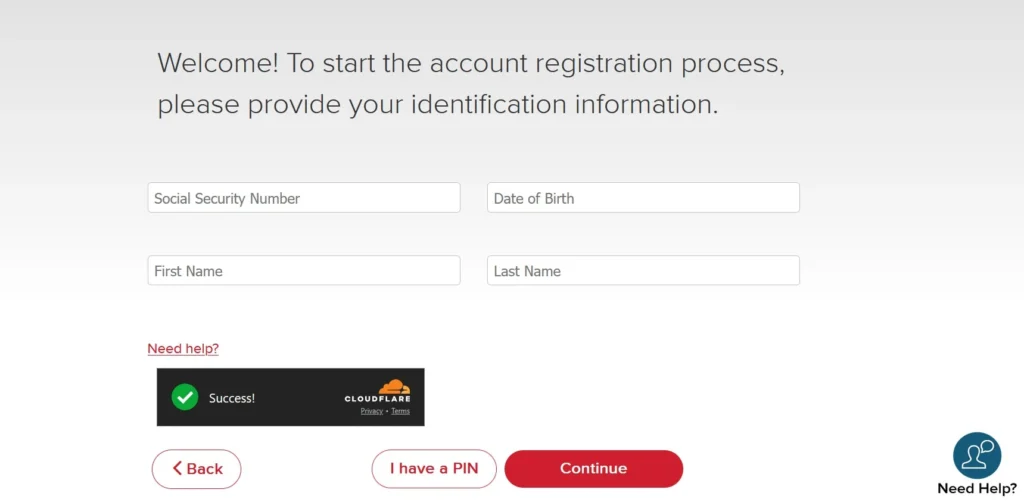
- Go to michaels401k.voya.com
- Click on Register Now
- Enter your Social Security number
- Enter Firstname, Lastname, and date of birth and click on next.
- Enter either your Personal Identification Number that was mailed to you or your date of birth
- Create a secure username and password
- Add your email address and mobile phone number for account recovery
- Confirm and complete the registration
Once registered, you will be able to access your account on the website or through the Voya Retire mobile app.
This process is encrypted and designed to protect your private information.
Why Your PIN Matters?
The Personal Identification Number or PIN is extremely important. You will need it when talking to a Voya representative or when performing certain automated transactions by phone.
If you do not have your PIN, you can request a new one in two ways:
• Visit michaels401k.voya.com
• Call 833 396 4015
This number is the Voya customer support line for Michaels employees. Keep your PIN stored safely in a private place.
Customer Service Support Details
Voya provides direct support for Michaels employees who need help with their 401k accounts.
Here are the contact options:
Phone 833 396 4015
Hearing impaired support 800 579 5708
Service hours
Weekdays from 7 AM to 7 PM Central Time
Closed on stock market holidays
Support is available in English and Spanish. Having your PIN ready will speed up the process when speaking to an associate.
What You Can Do After Logging In?
Once your account is active, you unlock several powerful tools that help you stay in control of your financial future:
• Review your current balance
• Check contribution history
• Monitor investment performance
• Update your beneficiary information
• Add or edit personal contact details
• Set up or update banking information for withdrawals
• Explore education tools for retirement planning
It is recommended that you review your account information carefully during your first login to ensure everything is correct.
Important Update About Banking Information
Any banking details that were stored with Vanguard did not transfer to Voya.
If you want to set up direct deposit for withdrawals or future distributions, you need to manually add your bank information.
Follow this path after logging in:
- Click your name in the upper right corner
- Select Personal Information
- Click on Banking Information
- Choose Add or Edit
- Enter your bank account details
Make sure you add this at least seven days before you request a withdrawal or distribution.
This step helps prevent delays in receiving your funds when you need them.
Using the Voya Retire Mobile App
Voya offers a mobile app called Voya Retire which makes it easy to manage your account on the go.
With the app, you can:
• Check balance instantly
• Monitor investments
• Update personal information
• Get helpful insights for saving
• Track progress toward goals
The app is available for both Android and iOS. Just search for Voya Retire in your app store and sign in using the same username and password you created on the website.
This mobile access helps you stay connected and motivated without needing to log in through a computer.
Keeping Your Account Secure
Security is critical when dealing with retirement funds and personal information. Voya maintains strong safeguards, but there are steps you should take as well.
• Create a strong and unique password
• Do not share your login with anyone
• Avoid using public computers
• Update your phone number and email regularly
• Enable two step verification if available
Keeping your details updated also helps with account recovery in case you forget your password.
Common Questions from Michaels Employees
Is my money safe at Voya?
Yes. Voya is a trusted and regulated retirement service provider in the United States. Your funds are protected and managed securely.
What if I no longer work at Michaels?
Former employees can still access and manage their retirement funds through the same Voya portal.
Can I change my investments?
Yes. You can review and adjust your investment selections based on your goals and risk comfort once logged in.
How often should I check my account?
A good habit is once every month for monitoring and once every quarter for detailed review.
Do I have to move my money?
No. You can leave your funds with Voya or choose to roll over to another qualifying retirement account.
Why This Matters for Your Future?
Retirement planning is not just paperwork. It is about protecting your future life and choices. A well managed 401k gives you more options, less stress and greater freedom later in life.
The move from Vanguard to Voya is an opportunity to take another look at your savings habits. Many employees discover:
• They are able to increase contributions
• They want to adjust risk levels
• They need to confirm beneficiary details
• They need better clarity around goals
This moment can be a fresh start for building a more confident plan for the years ahead.
Final Words
Take ten minutes today and log in to your Voya 401k account at michaels401k.voya.com. Look at your balance. Confirm your information. Check your beneficiary. Add your bank details if needed.
This small action can create big peace of mind.
Retirement security is built from simple steps done consistently. You have already worked for your savings. Now give them the attention they deserve.