Michaels employees can securely view and download their payslips using the company’s Single Sign On SSO portal, which connects to Workday for payroll and WorkSmart for scheduling. Both systems are mobile friendly, allowing employees to access pay stubs through a browser or the official Workday mobile app.
This guide explains the correct and current steps for accessing Michaels payslips on mobile devices, including browser based access and app based access.
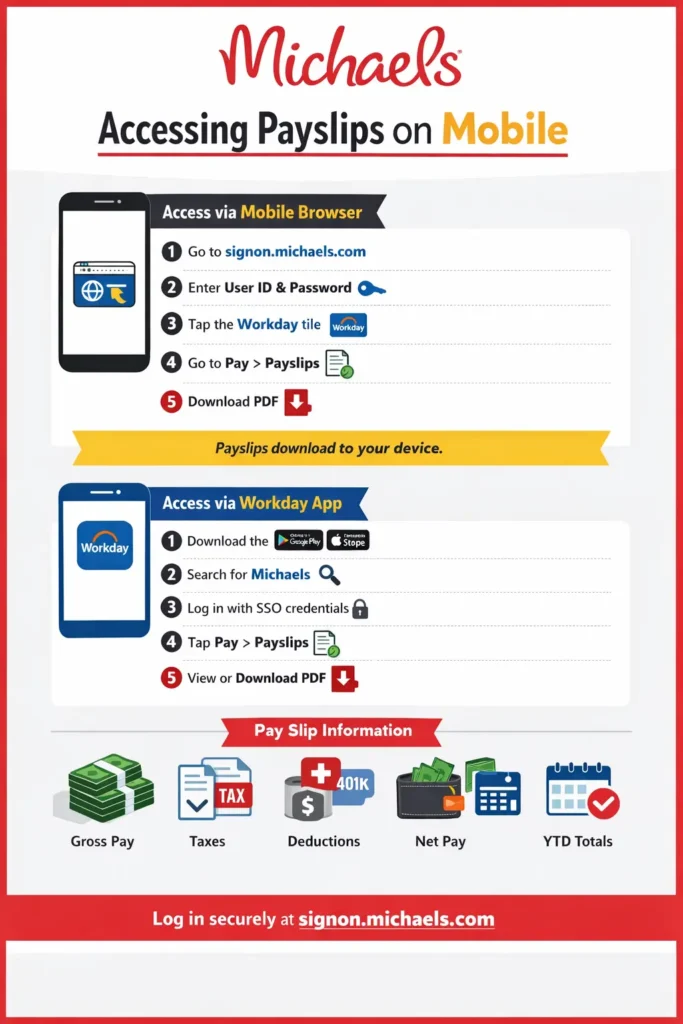
Browser Access Overview
Employees can access payslips directly from any mobile browser without installing an app.
- Open a mobile browser such as Chrome, Safari, or Firefox
- Visit https://signon.michaels.com
- Log in using Michaels network credentials
- Select the Workday tile
- Navigate to the Pay section
- Choose a pay period
- View or download the pay slip PDF
Pay slips download directly to the device and can be stored or shared as needed.
Detailed Login Process on Mobile Browser
Employees begin by opening their mobile browser and entering https://signon.michaels.com in the address bar. The page redirects to Michaels Single Sign On portal.
Login Credentials
- User ID is assigned during onboarding
- Password is the Michaels network password
New hires receive temporary credentials from management or HR and are prompted to change the password during first login.
Once credentials are entered, the portal authenticates the user and displays available system tiles, including Workday and WorkSmart.
After successful login, employees see multiple tiles.
- Workday is used for payroll, pay slips, tax forms, and benefits
- WorkSmart is used for schedules and time tracking
To view payslips, employees must select Workday.
Accessing Pay Slips in Workday
Inside Workday:
- Tap the Pay option
- Select Payslips
- Recent pay periods appear at the top
- Tap a specific pay date
- Select View Payslip or Download PDF
The pay slip opens as a PDF and can be saved to the phone’s storage.
Mobile Browser Experience
Workday is optimized for mobile browsers and adjusts automatically to screen size.
Helpful tips:
- Use landscape mode for better readability
- Zoom in for detailed tables
- Clear browser cache if pages fail to load
- Use secure networks when accessing payroll
No separate browser installation is required.
Using the Workday Mobile App
Employees may also access payslips through the official Workday mobile app.
App Installation
- Download Workday from Google Play or the Apple App Store
- Open the app
- Search for company name Michaels
- Log in using the same SSO credentials
The app provides faster access and push notifications when new pay slips are available.
Workday App Pay Slip Access
Inside the app:
- Tap Pay
- Select Payslips
- Choose a pay period
- View or download the PDF
Downloaded pay slips are stored securely within the app and can be shared by email if needed.
What Information Pay Slips Include
Michaels pay slips typically show:
- Gross earnings
- Regular and overtime hours
- Pay rate
- Taxes withheld federal, state, and local
- Benefit deductions
- Net pay
- Year to date totals
This information helps employees verify earnings and track income for tax purposes.
Common Troubleshooting Issues
Invalid Login
- Double check User ID and password
- Ensure caps lock is off
- Use the Forgot Password option if needed
Missing Pay Slip
- Pay slips usually appear shortly after payday
- Processing delays can take up to 48 hours
App Problems
- Update the Workday app
- Restart the device
- Reinstall the app if issues persist
Security Best Practices
- Never share login credentials
- Confirm the URL begins with https
- Log out after accessing payroll on shared devices
- Use device screen locks and biometrics
Michaels uses secure authentication to protect employee payroll data.
Browser vs App Comparison
| Feature | Browser Access | Workday App |
|---|---|---|
| Installation | Not required | Required |
| Speed | Standard | Faster |
| Notifications | No | Yes |
| Offline Access | No | Limited |
| File Storage | Device downloads | App secure storage |
Support for New Employees
New hires receive login instructions during onboarding. Managers and HR teams assist with access issues, and training materials explain how to use Workday and WorkSmart effectively.
Final Thoughts
Michaels makes it easy for employees to access payslips on mobile devices through a single secure login. Whether using a browser or the Workday app, employees can quickly view, download, and manage their payroll information anytime and anywhere.
This mobile friendly system reduces paperwork, improves transparency, and gives retail employees full control over their pay information.